REVIEW · LONDON
Londra Audioguide – TravelMate app for your smartphone
Book on GetYourGuide →Operated by MyWoWo Srl · Bookable on GetYourGuide
Your London guide is already in your pocket. The Londra Audioguide on the TravelMate app turns major sights across Greater London into walkable audio moments you can use anytime, without paper tickets. I like the setup because it’s truly self-guided—download, start, and go.
I also love that the audio is repeatable. You can listen online or offline, and you’re not forced into a single-use ticket or a one-and-done tour format.
One drawback to keep in mind: everything hinges on your activation code from your email. If you miss that message or can’t find the code, you’ll waste time before the first track even starts.
In This Review
- Key highlights to look for
- A Self-Guided London Audio Tour, Start Anywhere
- What You Actually Get: 70 Tracks and 215 Minutes
- Price and Value: When $5.63 Works
- Your London Stops, Stop by Stop (and How to Use Them)
- London Introduction
- The Wonders of Local Cuisine
- British Museum
- Buckingham Palace
- Harrods
- Houses of Parliament
- Hyde Park
- London Eye
- Madame Tussauds
- National Gallery
- Natural History Museum
- Notting Hill
- Piccadilly Circus
- Royal Albert Hall
- Soane Museum
- St. Paul’s
- Tate Britain
- Tate Modern
- The Tube
- Tower Bridge
- Tower of London
- Trafalgar Square
- Victoria & Albert Museum
- Westminster Abbey
- Using Text, Quiz, and the Offline Option Like a Pro
- Who Should Use This London Audioguide (and Who Might Not)
- Should You Book This London Audioguide App?
- FAQ
- Do I need a meeting point for the Londra Audioguide?
- How long is the audioguide valid?
- Can I listen to the audio guide offline?
- What languages are included?
- Is the app wheelchair accessible?
- Where do I find the activation code?
- How much audio content is included?
Key highlights to look for

- Self-guided autonomy with no paper tickets to collect
- Offline or online listening, so you can plan around Wi‑Fi
- 70 audio tracks (215 minutes) covering major London points of interest
- Text support in the app to read along when you want
- A quiz section to test what you picked up as you go
A Self-Guided London Audio Tour, Start Anywhere

This experience is basically a London guide you control. There’s no meeting point. You download the TravelMate app, find your activation code, and start wherever you prefer in Greater London.
That sounds simple, and it is. But it matters because London is big and timing can get messy. With an app-style tour, you’re not trapped by a group’s pace or a guide’s schedule. You can duck into museums, pause for a coffee, then resume when you feel like it.
The app is designed around audio that feels like a real guide beside you—covering history, points of interest, and curiosities—but delivered through your smartphone and headphones. You’ll also have the option to read the text of the audio files inside the app. That’s handy when street noise makes audio harder to catch.
You’ll want earphones. The included guidance recommends them, and honestly, it’s also just polite. London sidewalks are not built for everyone to hear your soundtrack.
Finally, one small practical win: because it’s your phone (not shared devices), you avoid the whole awkward question of handing around gadgets. You’ll still want to keep your phone charged, though—because unlike a paper booklet, this lives and dies by battery life.
You can also read our reviews of more tours and experiences in London



What You Actually Get: 70 Tracks and 215 Minutes

The full content is 70 audio segments totaling 215 minutes. That’s enough time to build a mini-adventure across several neighborhoods and landmarks without feeling like you’re taking a whole day class.
If you do the math, that’s about 3 minutes per audio segment on average. Some will probably run longer, some shorter, but the overall feel is “quick, useful, and repeatable.” This is ideal for active walking days, not for sitting still for hours.
The audio content is described as professionally created, written by high-level authors, then interpreted by professionals from television and radio. In practical terms, that usually means clearer narration and a tone that stays listener-friendly—not a monotone lecture.
The app also includes a quiz section. This is one of those features that can turn passive listening into active learning. If you like to remember facts (or just want something to do on a break), the quiz gives you a simple way to check your understanding as you move between stops.
Languages are a major plus. The audioguide is offered in Italian, English, German, French, Chinese, Russian, and Spanish. If you’re traveling with someone who prefers a different language, you’re not stuck with one narration track.
Wheelchair accessibility is also stated as available, which is good news for travelers who need routes and experiences designed to be usable on the ground.
Price and Value: When $5.63 Works
The price listed is $5.63 per person and it stays valid for 1095 days from first activation (about three years). That’s what makes this different from many “book a day, hear it once” audioguides.
Here’s the value logic I’d use:
- If you’ll visit only one or two sights, you may not use all 215 minutes. Still, even a handful of segments can be worth it when they guide you through the stories behind what you see.
- If you’ll be in London longer, or you want to revisit areas later, the long validity turns it into a library of audio you can return to.
- If you’re the type who likes to repeat things—same museum, same walk, new understanding—this doesn’t punish you for going slow.
Also, you can listen online or offline, which adds savings indirectly. You’re less dependent on continuous data or finding Wi‑Fi at exactly the wrong moment.
There’s one more angle: the app lets you read the text of the audio files. That makes it more usable if you’re in a noisy spot, or if you just learn better by seeing words alongside speech.
One caution on value: a small number of buyers reported problems with the purchase process. That doesn’t mean the product is bad—it just means you should pay attention right after booking. Save your confirmation email and keep an eye on spam folders so you’re not stuck at activation time.
Your London Stops, Stop by Stop (and How to Use Them)

The content list includes a mix of landmarks, museums, royal sights, neighborhoods, and a transit-focused segment. There’s no stated order you must follow, so think of this as a menu. Pick the stops that match your route that day, then let the audio fill in context as you walk.
London Introduction
Start here if you want a quick orientation. It’s a good choice on day one, or anytime you feel disoriented and want the app to give you a “what matters and why” frame.






The Wonders of Local Cuisine
This segment is your cue to think beyond monuments. Use it when you’re planning meals or when you want ideas for what to try in the city’s food scene—then switch to audio mode while you’re deciding.
British Museum
Use this track if you’re heading into a major museum environment. The audio format is designed to help you notice what’s around you and connect it to the bigger story you’re seeing.
Drawback to watch for: museums can be vast. If you try to cover everything, you’ll feel rushed. Instead, use the audio as a guide to focus on what you want most.
Buckingham Palace
This one is for the royal-landmark mood. The audio should help you understand the significance of the site and what to look for as you stand there.
Consideration: royal areas can be crowded depending on timing. If you want cleaner listening, choose a moment when you can hear your headphones comfortably.
Harrods
This track fits a “famous place, iconic setting” stop. It’s useful when you want context that goes beyond just seeing the storefront.
Tip: if you’re shopping, you may want to start the audio before you enter so you’re not juggling phone handling and bags at the same time.
Houses of Parliament
Use this segment when you’re in the political-center area. The audio is built to provide history and curiosities tied to the location.
Possible drawback: the public space can be busy. If you struggle with audio clarity, rely more on the text view inside the app.
Hyde Park
This is your reset stop: a big, open-sky feeling in your walking plan. The audio should give you context for what you’re seeing while you take a slower stretch.
Practical approach: save this for a time when you can pause and actually stand still for a minute, not just walk through.
London Eye
This is ideal if you want context while you’re thinking about viewpoints. The audio format can help you interpret what this landmark represents in the city’s visitor experience.
Consideration: if you’re also managing lines or waiting, audio can help pass the time, but keep enough battery for the whole day.
Madame Tussauds
Use this segment if you want a fun, light tone around a major attraction. The app’s style should keep it moving—history and curiosities, delivered in short usable chunks.
Drawback: it’s easy to overload on attractions in one day. If you do, your brain may blur the audio tracks together. Pick fewer stops and do them well.
National Gallery
This is a great track when you want museum context. Use it to guide your attention while you’re in that gallery environment.
Possible drawback: if you’re not in the mood for museums, you’ll lose momentum. If you are, this segment can make time feel more meaningful.
Natural History Museum
Like the National Gallery, this is best for when you want a museum visit to have a guided narrative feel. The audio can help you understand what makes the site interesting beyond the broad reputation.
Practical tip: if you start feeling “museum fatigue,” pause the audio and come back later. The app doesn’t expire.
Notting Hill
Use this track when you want neighborhood atmosphere. This segment is a good fit for wandering slowly and letting the city show itself rather than racing between landmarks.
Small caution: neighborhood walks can involve lots of turns. If you rely heavily on audio, keep your screen attention reasonable for safety.
Piccadilly Circus
This works for a high-energy landmark stop where you want context. The audio can keep you from just snapping photos and moving on without learning anything.
Consideration: busy street corners can make listening tough. Switch to the app’s text view when you need it.
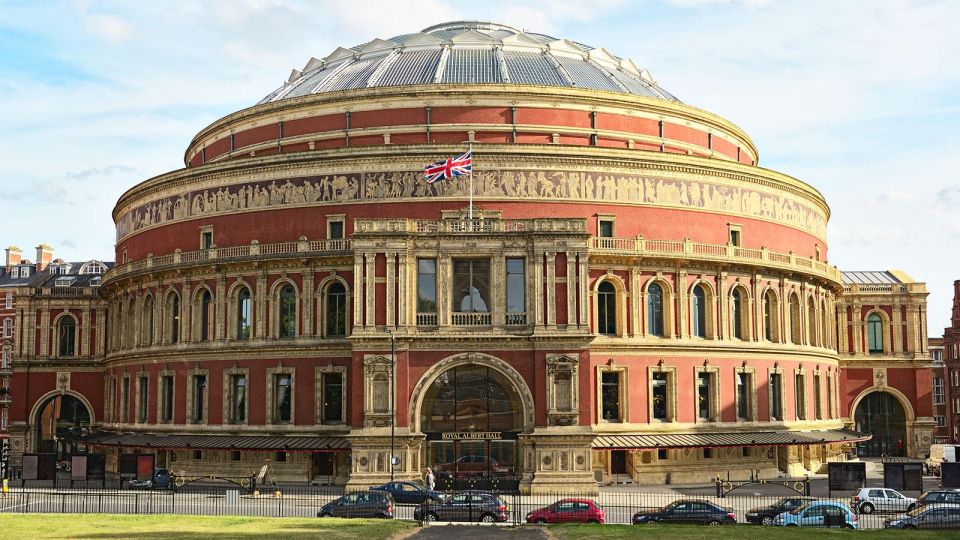
Royal Albert Hall
This is a “big cultural building” audio moment. The narration should add background and curiosities connected to the site while you’re there.
Tip: if you’re also catching a show later (if schedules allow on your trip), audio can help you appreciate the venue more in advance. If not, it still makes the building feel less random.
Soane Museum
Use this track when you want a museum stop that feels more intimate than a mega-attraction. The audio should help you focus on what to notice as you explore.
Drawback: small museums can still be detail-heavy. Don’t force every room. Follow what interests you and let the audio end naturally.
St. Paul’s
This segment is for the “big city icon” moment. You’ll get a guide-style explanation designed to help you interpret what you’re seeing.
Practical approach: if you’re planning photos, start the audio, then pause playback when you want full attention on framing. Resume after.
Tate Britain
This is another museum track in the list, and it’s ideal if you want art visited through a guided story lens. Use the audio to add context so the experience feels like more than rooms and walls.
Possible drawback: art galleries can vary wildly by what’s on display on your day. The audio should give general interpretive value, but your personal interest in the exhibits still matters.
Tate Modern
Same idea, different vibe: this track suits a modern-art museum stop where you want the audio to provide story and curiosities as you explore.
Tip: don’t try to do every gallery. The app is designed to be used in chunks that fit real walking patterns.
The Tube
This one is different: it’s about London’s transit system. Use it when you want help thinking about how the Tube fits into city life.
Practical use: if you’re hopping between neighborhoods, listen to this segment before your first major transit day so you feel mentally prepared.
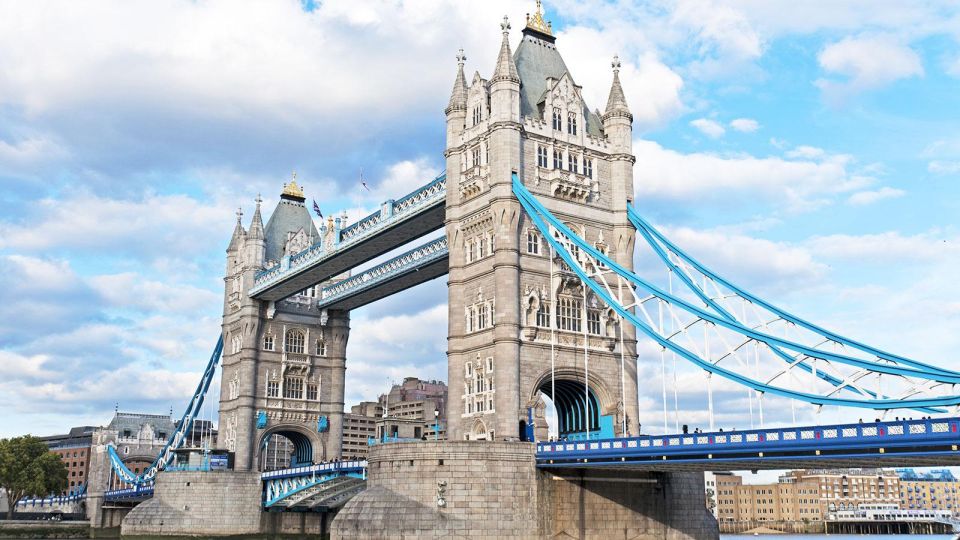
Tower Bridge
Use this audio when you’re at the river-bridge landmark. The narration should connect the site to the bigger London story, so you understand what makes it special beyond looks.
Consideration: if it’s windy or noisy, lean on the text view.
Tower of London
This segment pairs well with the nearby historic-core vibe. The audio should offer history and curiosities aligned with the experience of being at the site.
Caution: historic sites can take longer than you expect. Build in “buffer time” so you don’t rush the audio or skip it entirely.
Trafalgar Square
This is a good one for a central-stop walking day. Use the audio to help you make sense of the square’s role and what to notice while you’re standing there.
Practical tip: when you’re taking a break there, it’s also a nice moment to do one quiz question afterward, if the app places the quiz where you can access it easily.
Victoria & Albert Museum
This museum track is for when you want your day to include more culture and story. Use the audio to guide your attention so you don’t wander randomly.
Drawback: like any museum, it can turn into a “too much, too fast” day. Pick the audio segments you care about most and stick to that plan.
Westminster Abbey
Use this track if you’re ending your day in the Westminster area mindset. The audio is set up to add context and curiosities so the site feels connected to the city, not just another stop.
Tip: if your day ends tired, this can still work because the audio is short segments. You don’t have to stay in learning mode the whole day.
Using Text, Quiz, and the Offline Option Like a Pro

Here’s how to get the most value from a phone audioguide without making your trip feel like you’re glued to a screen.
First, treat headphones as your “pause and listen” tool, not a constant background noise. Use audio when you’re standing still enough to hear it. When you’re walking through busy streets, switch to the app’s text view or just move between stops, then resume.
Second, the app lets you read the text of the audio files. That’s a quiet superpower. If a sentence didn’t land, you can read it in your own rhythm and keep your momentum.
Third, use the quiz section as a break. If you take 30 seconds after a few tracks, it can help the information stick. Even if you don’t care about scoring, it’s a natural way to stay engaged instead of passively listening until you forget what you heard.
Finally, plan around offline listening. The app supports both online and offline playback. That means you can keep your day flexible: listen while you have data if it’s convenient, but don’t assume Wi‑Fi will always be there at the exact moment you want it.
Who Should Use This London Audioguide (and Who Might Not)

I think this audioguide is a strong match if you:
- want autonomy and dislike paper tickets
- like short, focused audio segments you can replay
- prefer learning at your own pace while walking
- want multilingual support for your group
- enjoy museum and landmark context without booking a guided tour time slot
It may be less ideal if:
- you hate using apps during sightseeing
- you know your phone battery is unreliable
- you want a fully planned route with set timing and guided logistics
The long validity window helps a lot here. Even if your first trip isn’t perfect, the audio remains available for 1095 days from first activation.
Should You Book This London Audioguide App?

If your goal is a flexible London day—pick your sights, listen as you go, replay later—then this is an easy “yes.” The best part is the combination of 70 audio tracks and long validity, for a price that’s low enough to feel like an add-on rather than a big commitment.
I’d book it if you’re comfortable managing an activation code from your email and you’ll use earphones. If you’re the type who gets stressed by setup steps, plan a calm moment to download the app and confirm the code before you start your sightseeing day.
If you want strict handholding and a scheduled group experience, look elsewhere. But if you want a smart audio guide in your control, this one makes a lot of sense.
FAQ
Do I need a meeting point for the Londra Audioguide?
No. There is no meeting point. Download the app and start your experience straight away wherever you prefer.
How long is the audioguide valid?
It’s valid for 1095 days from the first activation.
Can I listen to the audio guide offline?
Yes. The app supports listening online or offline.
What languages are included?
The audio guide is available in Italian, English, German, French, Chinese, Russian, and Spanish.
Is the app wheelchair accessible?
Yes, wheelchair accessibility is stated as available.
Where do I find the activation code?
Your activation code is in the email. Open Show activity details (or Show your tickets here), then find the barcode and the 10-digit small number under it. The code is also accessible via the GetYourGuide app link in the email.
How much audio content is included?
The audioguide includes 70 audio content items, for a total duration of 215 minutes.